Showing posts with label Accelerated Reader. Show all posts

Sunday, March 9, 2014

Bright Ideas Blog Hop #2

So excited to see the coming of another Bright Ideas Blog Hop! It was so much fun last time, and I got so many wonderful ideas.  I can't wait to see what teaching treasures I walk away with this time!


So the topic for my post today goes out to all those who have maybe recently acquired a new, fancy, schmancy, interactive whiteboard.  Maybe you have transferred your usual calendar math activities onto said whiteboard, and now you are left with a bajillion calendar cards, of various colors and themes.  Like this!  


Now what are you supposed to do?  Throw them out?  No way! ….

4+ Ways to Reuse Old Calendar Math Cards

1) AR (Accelerated Reader) Testing Management


This pocket chart has a pocket for each student (I use student numbers in my classroom.)  Each pocket holds three cards for each student, with their class number on it.


Green means, "Everything is great.  I have a book, and I am reading."

Yellow cards are put under the "I need to take a test" sign.  Students are trained to put their yellow cards back into their pocket after they take their test, and then notify the next student in line. (Tip: These cards have a little bit of magnet tape on the back!)


Finally, the red card means, "I am out of books, and I need to go to the library."

This system has made AR and library visits very easy to manage.

2) Bathroom Management


When students leave for the restroom, they put their card up.  Now you can account for everyone. When they come back, they can either put it back into a chart pocket, or drop it into a container like the green one above.  At the end of the day, you can chart who is leaving the room, and see if any students are abusing this privilege, or spending too much time out of class.

3)  Waiting For Teacher Management


4)  Pairing Up and Small Groups


Pass out cards.  All the 3s pair up, or all the greens, all the jack-o-lanterns, all the Valentine's hearts, all the triangles, etc…  

5) Your idea here!  Leave a comment at the end of this post with your idea of how you use, or might use, your leftover calendar math cards. 

Now head on over to 

All Things Apple in 2nd


to learn about how Velcro can make your life as a teacher easy-peasy!

You can also check out the linky below!


Tuesday, August 21, 2012

Technology Tip Tuesday Linky Party

I am linking up today with Blog Hoppin' for Technology Tip Tuesday!   I love technology!  


Mrs Rios Teaches: Fun, easy, and (mostly) free technology tips, tools, and apps for the primary classroom.

If you remember my last series of technology posts (Day 1, Day 2, Day 3), I mentioned that I had gone to a technology conference, and I honestly felt like I was the only person on the planet without an Ipad.  It was so pitiful.  But, I am proud to give you all an update that I am a proud owner of a beautiful, refurbished, Ipad.  I've had it for a couple of weeks and am in love with it.

Yes, I said refurbished.   Let me tell you why I decided to buy a refurbished Ipad.

1)  You save an average of about $100 compared to new.

2)  Each refurbished Ipad comes with a full 1 year warranty, a beautiful little white box, brand new battery and charger, and a brand new outer shell.

3)  Each refurbished Ipad goes through a rigorous, personal inspection.

4)  Since I will be using my Ipad both at home and school, AND was using my own personal funds to purchase it, I thought it best not to spend top dollar on it.  Just in case!

5) Apple is awesome!  I bought my Ipad online on a Sunday.  The estimated delivery date was about 3-4 weeks.  But, I had my Ipad by that Friday.

6) Shipping is Free!  

You can purchase a refurbished Ipad at the Apple Store.  I should warn you that they are not always available.  It depends on their inventory.  Anyway, when you get to the Store, scroll all the way down, and on the left side you will see a category called Special Deals.  Then, just look for Refurbished Ipads.  They have the latest Ipad, and the older Ipad 2 right now.  I bought the Ipad 2  (see reason #4 above) with 16GB, WiFi, and 3G.  This model meets my needs perfectly. 

So, how do I plan on using it, you ask? 

I love Apps!

For my Accelerated Reader friends out there.  "They have an App for that."  I have two stand-alone computers in my classroom for a class of 27 second graders.  The goal I have set for my second graders is 150 books/passed tests this year.  This would be very difficult with only two computers.  But, I can now have them test using the Ipad AND our Ipod donated through DonorsChoose.Org.  So, now we have 4 testing computers!


I set up my class in Class Dojo for fun.  It is an online classroom management tool.  You can use it wirelessly from anywhere in your classroom with the Ipad (Ipods and SmartPhones work, as well). I might try it out!  


There is so much more, but I am a "one foot in front of the other" type girl.  But, I do have "plans".  Here is a great article I found on getting the most out of ONE Ipad in the classroom.

http://eskymaclj.blogspot.com.au/2012/02/only-1-ipad-in-classroom.html

Check out some more great Tech Tips by clicking on the linky button below.


Looking for more technology ideas? Follow me on Pinterest!


Have a great day,

Nicole

Monday, July 30, 2012

One Last Hoorah...and My First Day of School


Hi Everyone,

I just got back from camping at the beach for 4 days.  We had so much fun. Every year my father's side of the family puts on a big family reunion.  It is a relaxing time for me, and has created many cherished memories for my kids.  There is no other way that I would want to spend the last few days of my vacation.

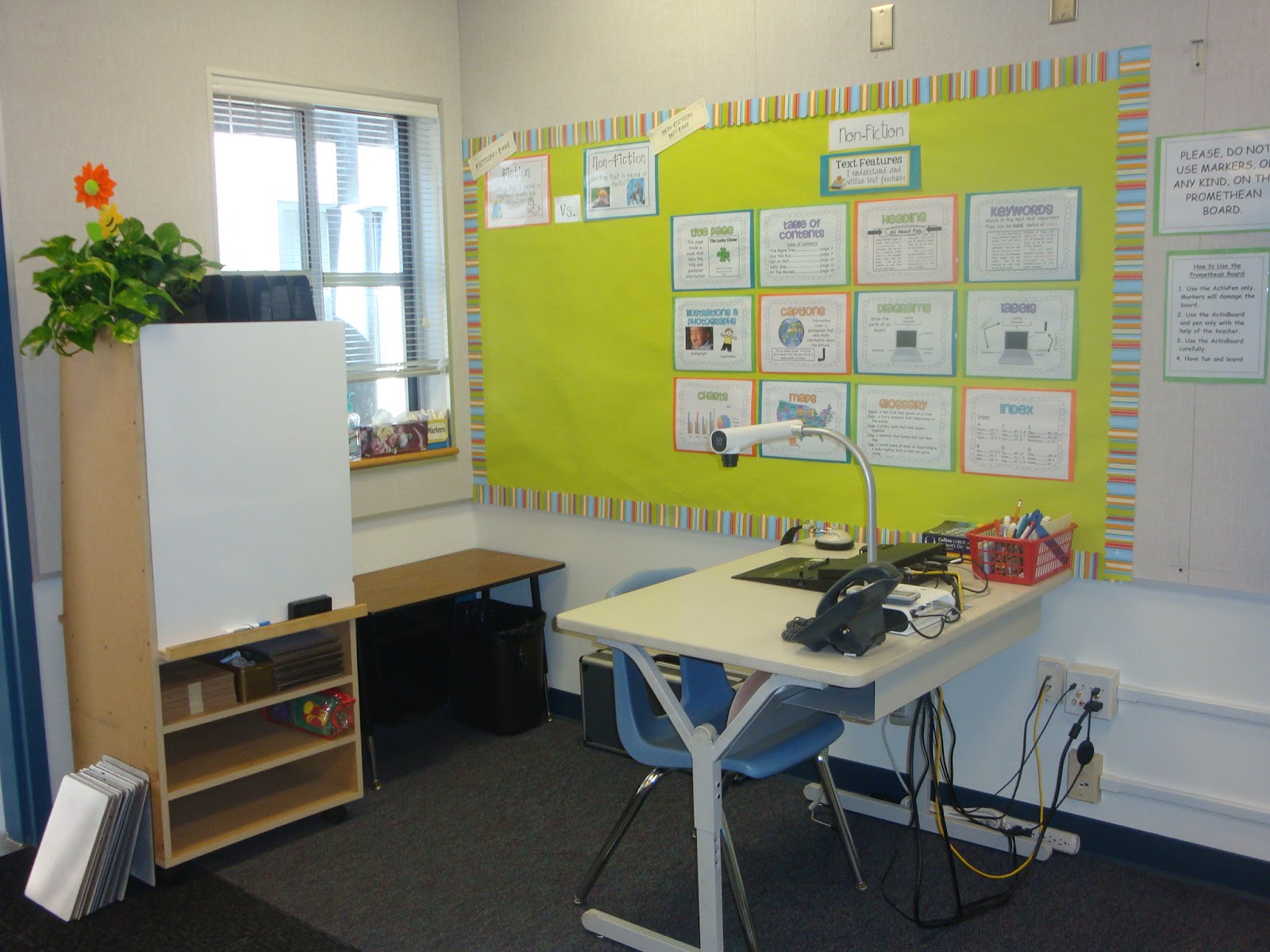
So, yes, I started school yesterday!  I finished my room the day before I left for the camping trip.  I still have a lot of organizing (a.k.a  purging) to do.  But, all the areas that are visible to the eye are pretty much in order.

Here are some pics of the (almost) finished product.  As I mentioned before, I really ended up liking the lime green and teal together.  Believe it or not, it creates a very serene atmosphere inside the classroom.  

Below is my computer/docucam desk area and my Non-Fiction bulletin board.  I downloaded the Non-Fiction charts on the right from Primary Punch on Tpt HERE.  They're free!

I made the posters on the left to go with a beginning lesson where we discuss how fiction and non-fiction are different from one another.  You can download them HERE, for free.


This next area is my phonics word wall and Accelerated Reader board.  


Students receive a star/stamp/sticker for every 100% they receive on a test.  When they fill their incentive card, they receive a free coupon to a local restaurant, and a treat from my treasure chest. 


Speaking of AR.  As you can tell by these pictures, I have a Promethean Board.  I do EVERYTHING on that board and absolutely love it!  But, if you are like me, you might have been left with a lot of these...


Ever wondered what to do with these casualties of the interactive whiteboard?  Well, since I now do my calendar on the whiteboard, I have been thinking of what to do with these little guys.  

One thing I did to reuse these was to use them in my AR testing management.


This pocket chart has a pocket for each student (I use student numbers in my classroom). Each pocket holds three cards for each student.

Green means, "Everything is great.  I have a book, and I am reading."  

Yellow cards are put under the "I need to take a test" sign.  Students are trained to put their yellow cards back into their pocket when they take their test and also, to notify the next student when they are done testing. Most of the time, that last step is not necessary, as students pay close attention to where they are in the testing line. 

Finally, the red card means, "I am out of books, and I need to go to the library."  This system makes AR and library very easy to manage.

Ok, moving on....The picture below is of my reading board.  We will list the strategies we learn through out the year under each column.  The areas are Comprehension, Responding to Text, Accuracy, Fluency, and Terms and Vocabulary.  I downloaded these signs from Ladybug Teacher Files, for Free!  Click HERE to download your own.


Remember those cubbies that I emptied out after buying the green organizing bins to organize my math manipulatives?  


I ended up using those cubbies to organize my language arts and math intervention materials.


Here is the view from the back of the class.  If you are wondering about my long midievil table set up here.  I really don't have much choice.  My student desks are very long, and I like lots of empty space.  


So that's pretty much where my room is for now.  Notice that all the pics are of the front of the room.  Yeah, the back still needs some work.  That will have to be a work in progress.  

Anyway, we had a very good day today.  The students are very sweet, and I am looking forward to getting back to the business of teaching.  


Want to see more classrooms?  I'm linking up with Swimming into Second who is having a Classroom Reveal Linky Party.  Just click on the button below.
 
See ya tomorrow!

Nicole

Saturday, July 7, 2012

Classroom Themes Linky Party Fun!

Well, in my last post I told you that I am turning my attention to redecorating my classroom (Just wait until I post the pictures of the "Before"!) and back-to-school prep. I go back to work on the 25th of July! It is coming up too fast.
 
This year, I have decided to try a themed classroom...for the first time. I am excited. Apparently, I have been missing out on this popular trend. If you are still trying to decide on a theme for your classroom, then this is the post for you because I am linking up with Corrina from Surfin' Through Second. She is having a Classroom Theme Linky Party! Yay. I love parties.

My classroom theme is going to be...owls. I love them. I've also picked tangerine and lime colors to keep things bright and fresh. I need light...lots of light!
Anyway, I have been working on things that I will need for my classroom. I haven't purchased anything yet, other than a few cute pencil pails in the dollar bins at Target.

But, so far I have created...


So, above are are my teaching notebook cover and spine inserts.  Also, I created a S.O.A.R. students binder cover to keep my students organized. 

AND
I also made some classroom posters and forms.  Here's a Teacher Tip for anyone who uses Accelerated Reader in their classroom.  I print a couple of the forms on the right and randomly stick them in my printer.  (Insert them so any new print jobs will print on the other side of the paper.)  If a student gets 100% on their A.R. test, and it comes out on this form, they get a small prize from my Treasure Jar!  My kids loved it, and it really emphasizes reading for comprehension, not just reading to make weekly # goals.  Want to keep it even easier?  I mean we're busy right?  Just stick a few sheets of colored paper in your printer.  Whoever gets a 100% TOPS report on a colored piece of paper, receives some sort of recognition.  "Easy peasy, lemon squeezy!"

The owl on the left is for marking my table numbers.  I will print out two owls for each table.  I plan to cut them out, and glue them back-to-back, and then laminate them.  Then, I will cut them out (again) and hang them from the ceiling over each table.
The smaller owl on the right will be cut out for each table, and I will put a magnet on the back.  These get posted on my white board to manage table points.

Are you sick of me yet?  Because there is more...

The first one on the left is to keep me organized.  I'm going to post this by my teaching area....somewhere.  The other two pages go with our Classroom Birthday Book.  I create the cover (middle image) and all the kids write a letter to the birthday boy and/or girl.  Then, I just bind it all together.  Need easy, inexpensive birthday gift ideas to recognize your students' birthdays?  Visit this earlier post.

Honestly, there is more...but I think you get the picture here.  I can't wait to put it all together.

You can find the Differentiated Behavior Punch Cards that go with my owl theme in my Tpt store, HEREThese cute owl-themed behavior cards can be used to motivate a wide range of students. When students accomplish a task or other goal, simply punch a hole in a number on the card. Don't want to use a hole punch? You can also use a unique stamp, or sticker.  These can be used to motivate students in the areas of behavior, homework, reading, and math achievement.  These were definitely one of my favorite motivation tools from last year.  I have to give credit to Rachelle Smith over at What the Teacher Wants for this idea.  She has graciously granted me permission to put my own spin on her idea.  Thanks, Rachelle!


I also have Pirate themed, Beach, and Jungle (Zoo) Animal themed behavior incentive cards in my store, as well.  Click on any of the images below to take you to my TPT store.


I will be offering Space, and Dinosaur cards soon.  I even have a FREE Apple and Polka Dot set, just for you!

Wow, you made it to the end of this very long post.  I am very impressed with your "stick-to-it-ness"!  I would love to hear what theme you have planned for the coming school year. Leave your comment below.

Have a great day!

LinkWithin

Related Posts Plugin for WordPress, Blogger...